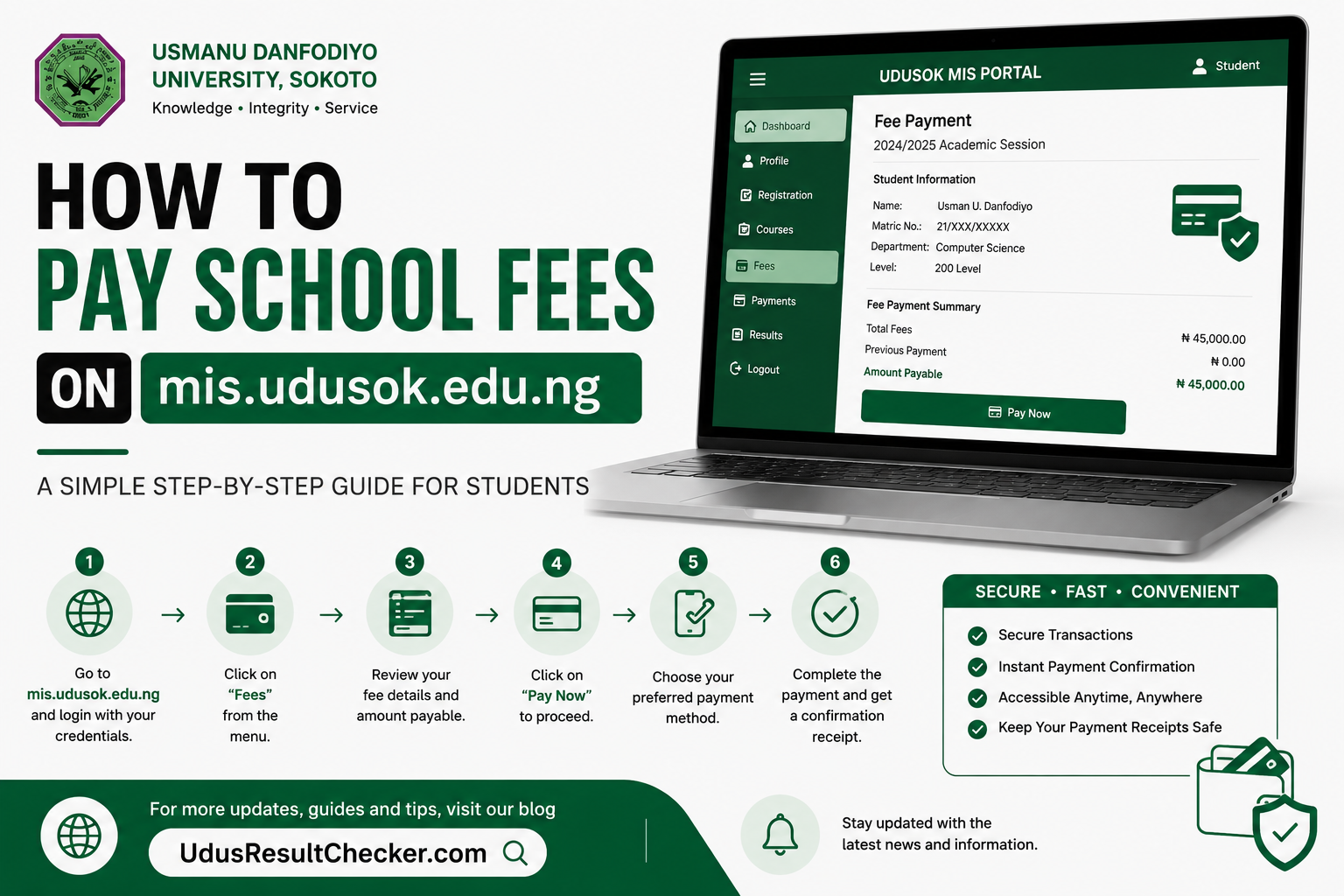
Paying your school fees on the UDUS MIS portal is one of the first and most important tasks you must complete at the start of every session, because without a confirmed payment, course registration simply will not open for you. This guide covers the entire process from logging into mis.udusok.edu.ng, generating your Remita invoice, making payment at a bank or online, and verifying the transaction back on the portal. Whether you are a fresh student doing this for the first time or a returning student who needs a clear refresher, you will find everything you need right here.
Official Portal Details
What the UDUS School Fees Portal Is and Why You Must Pay Before Anything Else
The UDUS MIS portal at mis.udusok.edu.ng runs on the EduERP platform and serves as the engine behind virtually every academic transaction in Usmanu Danfodiyo University Sokoto. School fees payment is not just a financial transaction; it is the gateway that unlocks your ability to register courses for the semester. The portal is configured so that any student who has not had their fees confirmed in the system simply cannot proceed to course registration, regardless of what stage of their programme they are in.
UDUS uses the Remita payment platform, which is the same government-approved payment infrastructure used by federal agencies and most federal universities across Nigeria. When you generate a Remita invoice from the MIS portal, you receive a unique Remita Retrieval Reference number, commonly called the RRR. This number is your proof of payment intent and is what the bank teller or online payment system uses to credit your account. The RRR on your receipt must match the one on your invoice exactly; any mismatch means the payment cannot be traced to your student profile.
School fees at UDUS cover a bundle of charges that typically include development levies, examination fees, library charges, laboratory or studio fees depending on your faculty, sports and student union dues, and other faculty-specific items. The total varies by programme level and student category. In the 2024/2025 academic session, documented invoices showed totals ranging from around N93,000 to over N99,000 for undergraduate students, with foreign students required to add a USD 1,000 surcharge to their naira total.
Current Portal Status as of May 2026
As of May 2026, the UDUS MIS portal at mis.udusok.edu.ng is active and functional. The 2025/2026 academic session fees schedule has been published, and the portal currently displays fee structures for the session. Students who need to confirm their exact fee amounts for the 2025/2026 session should log into their MIS dashboard directly, as individual fee breakdowns are generated per student based on their programme, level, and mode of entry.
📋 Note on Fee AmountsFee amounts differ between fresh UME students, Direct Entry students, returning students, part-time students, and postgraduate students. The exact schedule for your programme and level is displayed on your dashboard when you click “Pay Fees.” Do not rely on figures published for a previous session, as amounts are reviewed and updated each academic year.
The portal can experience slower load times during peak periods such as the start of semester registration windows. If the page loads slowly or times out, try again during off-peak hours, typically early mornings or late evenings. The payment infrastructure runs through Remita’s servers, which are separate from the UDUS MIS platform, so a slow MIS portal does not necessarily mean Remita is down.
Take a look at How to Reset Your UDUS Portal Password in 2026 (Step-by-Step)
⚠ Late Payment Warning – Usmanu Danfodiyo University has made it clear that late payment of school fees attracts additional penalty charges. Always check the academic calendar for the current session’s fee payment deadline and make sure you complete the process well before that date.
What You Need Before You Begin
Portal Access Requirements
You must have an active UDUS MIS account before you can generate any invoice. Fresh students are assigned login credentials during the admission confirmation and physical screening process on campus. Returning students use the same username (matric number) and password they have been using. If you cannot log in, visit the password reset guide on this site before continuing with this article.
Confirmed Admission and Screening
School fees payment on the MIS portal is only available to students who have already been confirmed by the university. For fresh students, this means completing the physical screening exercise and having your details activated on the portal by your faculty ICT support staff. Until your account is activated and confirmation is done, the “Pay Fees” option on your dashboard may either be absent or return an error.
Your Correct Schedule of Charges
Before heading to the bank or paying online, you need to see your specific schedule of charges as displayed on your MIS dashboard. This document lists each fee item and the total amount for your programme and level. You cannot generate a Remita invoice without first viewing and accepting this schedule through the portal.
A Functional Device and Internet Connection
You need a smartphone or computer with a working browser to navigate the portal and initiate the invoice generation. A stable internet connection is important because the system redirects you to Remita’s external platform mid-process. Losing connection at that point may require you to restart the invoice generation step.
What to Have Ready Before and After Payment
| Document / Item | Notes |
|---|---|
| MIS Portal Login Details | Your matric number (username) and password. Required to log in and access the “Pay Fees” section on your dashboard. |
| Schedule of Charges (UDUS Invoice) | Generated from the portal after clicking “Pay Fees.” Lists all fee items and the total amount specific to your programme and level. Print this before going to the bank. |
| Remita Invoice | Printed from the Remita website after clicking “Print Remita Invoice” on the portal. Contains your unique RRR number. This is what the bank teller uses to process your payment. Only this invoice is accepted at the bank. |
| Remita Payment Receipt | Issued by the bank after successful payment. Must contain the RRR number, which should match the one on your invoice exactly. Keep this receipt throughout your stay at UDUS. |
| Debit Card (for online payment) | Visa, Mastercard, or Verve card from a Nigerian bank. Required if you choose to pay directly on the Remita platform online rather than at a bank branch. |
| RRR Number (for verification) | The Remita Retrieval Reference number from your receipt. You will enter this back on the UDUS MIS portal to confirm that your payment has been received by the system. |
How to Pay School Fees on mis.udusok.edu.ng Step by Step
Follow each step in the exact order below. Skipping a step or going out of sequence is the most common reason students end up with unverified payments or mismatched RRR numbers.
Log Into the UDUS MIS Portal
Open your browser and go to https://mis.udusok.edu.ng. Enter your username (matric number) and your password in the fields provided, then click the Login button. Make sure you are on the correct site before entering your credentials to avoid phishing pages that mimic the portal’s appearance.
Click “Pay Fees” on Your Dashboard
Once logged in, look at the top-left area of your dashboard and click on “Pay Fees.” This will open your personal schedule of charges, which lists every fee item applicable to your programme, level, and student category for the current session. Take time to review the charges and confirm the total amount before proceeding.
Click “Pay Fee” and Then “Send Fee Details”
After reviewing your schedule of charges, click the “Pay Fee” button. On the next screen, click “Send Fee Details” to submit your fee information to the Remita system. This step is what triggers the creation of your unique Remita invoice and RRR number. Do not skip this step or navigate away from the page before it completes.
Generate and Print Your Remita Invoice
After submitting your fee details, you will see a link labelled “Print Remita Invoice.” Click it. This redirects you to the official Remita website, where your invoice is displayed with all your payment details and your unique RRR number. On the Remita page, click “Print Invoice” at the top-right corner of the screen to print or save the document as a PDF. You must have this invoice before you can make any payment.
Make Payment at a Bank or Pay Online
Bank branch option: Take your printed Remita invoice to any bank of your choice in Nigeria. Present the invoice to the teller, who will use the RRR number to process your payment. Collect your Remita receipt after payment and confirm that the RRR on the receipt matches the one on your invoice before leaving the bank counter.
Online option: On the Remita website, use your debit card (Visa, Mastercard, or Verve) to pay directly without visiting a bank. Follow the prompts on screen to complete the transaction. Save or print the confirmation page once payment is done.
Return to the MIS Portal and Verify Your Payment
After making payment, log back into mis.udusok.edu.ng and click on “Verify Payment.” Enter your RRR number in the field provided and submit. The portal will connect to Remita’s database and confirm whether the payment has been received. A success message means your fees have been verified and your account is now cleared for course registration. If you see an error, double-check your RRR number and try again after a few minutes.
Proceed to Course Registration
Once payment is verified, the portal will allow you to proceed to course registration. Navigate to your course registration section, select all applicable courses for the semester including required electives, and click submit to complete registration. Print your course registration slip from the portal and keep a copy for your records.
✅ Keep All Payment Documents – Store your UDUS schedule of charges, your printed Remita invoice, and your bank receipt in a safe place. You may need them during clearance, transcript application, or if a dispute arises about your payment status in any semester.
What Happens After Your Payment Is Verified
Payment verification on the UDUS MIS portal triggers a sequence of actions within your academic profile. Here is what each stage looks like after a successful fee confirmation:
Course Registration Window Opens
The moment your payment is verified, your student profile is flagged as fee-compliant for the session. The course registration module, previously locked or inaccessible, becomes available to you. You can now select and register your semester courses without getting an error message about unpaid fees.
Course Registration Slip Becomes Printable
After completing course registration, you can download and print your course registration slip from the portal. This document is required by most departments as proof that you have formally enrolled in courses for that semester. Some faculty offices will not process any academic request without sight of a current-session registration slip.
Result Access Is Maintained
The UDUS result checker system is tied to your registration status. Students who are not registered for a semester because fees were unpaid may find their results withheld or inaccessible on the portal for that period. Staying current with fee payment ensures your result history remains clean and uninterrupted on your profile.
Medical Form Access (Fresh Students Only)
Newly admitted undergraduate students gain access to the Undergraduate Medical Form through the MIS portal after completing payment and course registration. This form must be filled and submitted as part of your full admission processing. You will not be considered fully registered until this is done alongside your fees and course registration.
Clearance and Transcript Eligibility
At the point of graduation or during transcript applications, the Bursary and Registry will cross-reference your payment history for all sessions. Any unpaid or unverified session creates a gap in your record that can delay clearance. Keeping your receipts and ensuring each session’s payment is properly verified protects you from administrative hold-ups when you need your credentials most.
Frequently Asked Questions About UDUS School Fees Payment
Can I pay UDUS school fees online without going to a bank?
What is the RRR number and why does it matter?
What should I do if payment verification fails on the portal?
How much is the UDUS school fees for the 2024/2025 session?
Can I use any bank to pay the UDUS Remita invoice?
What happens if I pay school fees but do not register courses?
Can someone else pay my UDUS school fees on my behalf?
Final Word
Paying your school fees on mis.udusok.edu.ng is a process that has a clear beginning and a very specific end point, which is the payment verification step on the portal. A lot of students make the mistake of stopping after visiting the bank, assuming that handing over cash to the teller is the finish line. It is not. Until you log back into the portal and complete the verification with your RRR number, the system has no way of knowing that you paid. Always treat verification as part of the payment process, not as an optional extra step.
If you encounter problems at any point, your first call should be your faculty ICT support staff. Every faculty in UDUS has dedicated ICT staff whose job includes helping students with portal issues. They can escalate persistent payment problems to the Bursary Department and help ensure your records are correctly updated. Avoid paying third parties who claim they can fix portal issues for a fee; such transactions are not recognised by the university and leave you with no recourse if things go wrong.
Once your fees are paid and verified, your path to course registration is open. Prioritise getting your registration done early in the window rather than waiting until the last days, when the portal experiences the heaviest traffic. A registered student who also has their payment receipt safely stored is in the best possible position to focus on what actually matters, which is academic performance.
🔒 Disclaimer – UdusResultChecker.com is an independent student information resource and is not affiliated with, endorsed by, or officially connected to Usmanu Danfodiyo University Sokoto (UDUSOK), Remita, or any agency of the Nigerian government. All portal URLs, processes, and fee figures referenced in this article are based on publicly available and verified information at the time of writing. Fee amounts and payment procedures are subject to change by the university without notice. Always confirm the current session fee schedule and payment instructions directly from the official UDUS portal at mis.udusok.edu.ng or the UDUS official website a tudusok.edu.ng. For disputes or unresolved payment issues, contact the UDUS Bursary Department or ICT Directorate directly.